
Router
The SIE router is a stateless FastAPI proxy that sits between clients and GPU workers. It handles GPU-aware routing, load balancing, resource pools, and scale-from-zero orchestration.
When to Use the Router
Section titled “When to Use the Router”Not every deployment needs a router. The deciding factor is how many workers you have:
- Single server (local dev, single Docker container): Connect the SDK directly to the server (
http://localhost:8080). No router needed. - Multiple workers (Kubernetes, multi-GPU, Docker Compose scale): Use the router. It handles load balancing across workers, GPU-aware routing, and returns
202 Acceptedwhen workers are provisioning so the SDK can retry automatically. - The router is stateless — it discovers workers via the Kubernetes watch API or a static URL list, and holds no data of its own. You can run multiple router replicas behind a standard load balancer for high availability.
| Setup | Use Router? | Why |
|---|---|---|
| Single Docker container | No | Connect the SDK directly to the worker |
| Docker Compose (multi-worker) | Optional | Useful for a unified endpoint across workers |
| Kubernetes (any scale) | Yes | Required for multi-worker routing, scale-from-zero, and pool isolation |
Architecture
Section titled “Architecture”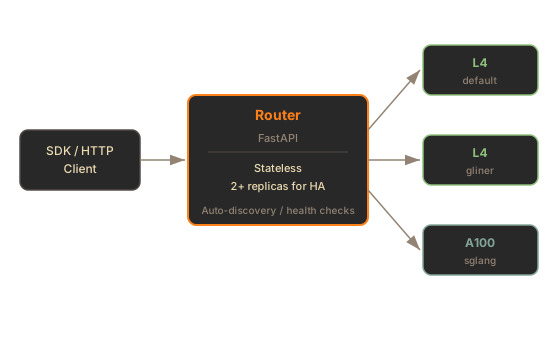
The router is stateless — it discovers workers dynamically and can be horizontally scaled.
Request Routing
Section titled “Request Routing”The router selects a worker based on:
- GPU type —
X-SIE-MACHINE-PROFILEheader matches a worker pool - Model affinity — Prefers workers with the requested model already loaded in GPU memory
- Queue depth — Routes to the least-loaded healthy worker
- Pool isolation —
X-SIE-Poolheader routes to reserved workers
GPU Routing
Section titled “GPU Routing”Every request must specify a target GPU type:
# HTTPcurl -X POST http://router:8081/v1/encode/BAAI/bge-m3 \ -H "X-SIE-MACHINE-PROFILE: l4" \ -H "Content-Type: application/json" \ -d '{"items": [{"text": "Hello world"}]}'# SDKresult = client.encode("BAAI/bge-m3", Item(text="hello"), gpu="l4")202 Scale-from-Zero
Section titled “202 Scale-from-Zero”When no workers are available for the requested GPU type, the router returns:
HTTP/1.1 202 AcceptedRetry-After: 120Content-Type: application/json
{"status": "provisioning", "gpu": "l4", "message": "Worker provisioning in progress"}
The SDK handles this automatically with wait_for_capacity=True. See Scale-from-Zero for details.
Worker Discovery
Section titled “Worker Discovery”Static Mode
Section titled “Static Mode”List worker URLs explicitly:
sie-router serve \ -w http://worker-1:8080 \ -w http://worker-2:8080 \ -w http://worker-3:8080Kubernetes Mode
Section titled “Kubernetes Mode”Auto-discover workers via Kubernetes service endpoints:
sie-router serve \ --kubernetes \ --k8s-namespace sie \ --k8s-service sie-worker \ --k8s-port 8080In Kubernetes mode, the router watches endpoint changes and automatically registers/deregisters workers.
Resource Pools
Section titled “Resource Pools”Resource pools reserve dedicated workers for tenant isolation. Pool workers only serve requests for that pool.
Create a Pool
Section titled “Create a Pool”client = SIEClient("http://router:8081")
# Reserve 2 L4 workers for this tenantclient.create_pool("tenant-abc", {"l4": 2})
# Route requests to the poolresult = client.encode( "BAAI/bge-m3", Item(text="hello"), gpu="tenant-abc/l4" # pool_name/gpu_type)
# Check pool statusinfo = client.get_pool("tenant-abc")
# Cleanupclient.delete_pool("tenant-abc")Pool Lifecycle
Section titled “Pool Lifecycle”- Pools are created on first request (lazy initialization)
- The SDK renews pool leases automatically in a background thread
- Pools are garbage-collected after inactivity (no active lease renewal)
Health & Status
Section titled “Health & Status”The router aggregates health from all workers:
| Endpoint | Description |
|---|---|
GET /healthz | Router liveness (always 200 if process is alive) |
GET /readyz | Router readiness (200 if at least one worker is healthy) |
GET /health | Cluster summary: worker count, GPU count, models loaded |
GET /v1/models | Aggregated model list across all workers |
WS /ws/cluster-status | Real-time cluster metrics stream |
Cluster Health Example
Section titled “Cluster Health Example”curl http://router:8081/health{ "status": "healthy", "worker_count": 3, "gpu_count": 3, "models_loaded": 12, "configured_gpu_types": ["l4", "a100-80gb"], "live_gpu_types": ["l4"]}CLI Reference
Section titled “CLI Reference”sie-router serve [OPTIONS]| Option | Default | Description |
|---|---|---|
--port, -p | 8081 | Router listen port |
--host | 0.0.0.0 | Bind address |
-w, --worker | None | Worker URL (repeat for multiple) |
-k, --kubernetes | false | Enable Kubernetes service discovery |
--k8s-namespace | default | Kubernetes namespace |
--k8s-service | sie-worker | Kubernetes service name |
--k8s-port | 8080 | Worker port |
-l, --log-level | info | Log level |
--json-logs | false | Structured JSON logging |
-r, --reload | false | Auto-reload on code changes (dev) |
What’s Next
Section titled “What’s Next”- Scale-from-Zero - the 202 flow and cold start handling
- Kubernetes in GCP - full deployment with router
- Monitoring - metrics and dashboards