
Overview
SIE processes requests through a multi-stage pipeline. Understanding this flow helps you tune throughput, debug latency, and optimize GPU utilization.
Request Flow Overview
Section titled “Request Flow Overview”Every request follows this path:
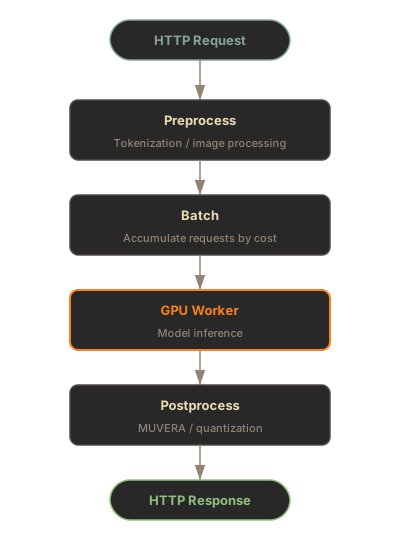
The server handles encode, score, and extract operations. All three share this architecture.
Preprocessing
Section titled “Preprocessing”Preprocessing runs on CPU in a parallel thread pool. This stage converts raw inputs into tensors.
Tokenization
Section titled “Tokenization”Text inputs are tokenized before batching. Tokenization runs in a parallel thread pool (up to 8 workers by default), computing the token count that determines batching cost. Original indices are tracked so results can be routed back to the correct request items.
Image Processing
Section titled “Image Processing”For multimodal models, images are resized and normalized. The same CPU thread pool handles both text tokenization and image processing, enabling overlap with GPU inference.
Cost-Based Batching
Section titled “Cost-Based Batching”The batcher accumulates requests based on token budget, not request count. This prevents large sequences from monopolizing GPU memory.
How It Works
Section titled “How It Works”The BatchFormer accumulates incoming requests and yields a batch when any of these conditions is met:
- Cost limit: Total tokens reach
max_batch_cost(default: 16,384) - Request limit: Request count reaches
max_batch_requests(default: 64) - Timeout: Wait time exceeds
max_batch_wait_ms(default: 10ms)
The timeout ensures low latency under light load, while the cost and request limits maximize throughput under heavy load.
Cost Semantics
Section titled “Cost Semantics”Cost varies by modality:
| Modality | Cost Calculation |
|---|---|
| Text | Token count |
| Images | 1 per image (fixed dimensions) |
| Audio | sample_count / chunk_size |
Padding Optimization
Section titled “Padding Optimization”Before inference, items are sorted by cost within each batch. This groups similar-length sequences together, minimizing padding waste. Short sequences batch with short sequences; long sequences batch with long sequences. This simple sort can reduce padding by 20-40% compared to FIFO ordering.
GPU Inference
Section titled “GPU Inference”The ModelWorker manages a single model’s inference pipeline. It runs inference in a dedicated thread to avoid blocking the async event loop.
Cross-Request Batching
Section titled “Cross-Request Batching”Items from different HTTP requests can share a GPU batch if they have matching configuration: same output types, same instruction (for instruction-tuned models), same query/document flag, and same LoRA adapter. This maximizes GPU utilization when multiple clients send concurrent requests with compatible parameters.
Worker Execution
Section titled “Worker Execution”The worker loop waits for batches from the BatchFormer, groups items by inference configuration, runs the model forward pass in a dedicated thread pool, and fans results back to waiting request futures. A single inference thread serializes GPU work, preventing memory fragmentation from concurrent CUDA allocations.
Postprocessing
Section titled “Postprocessing”After inference, optional transforms run on CPU:
MUVERA Transform
Section titled “MUVERA Transform”For ColBERT models, MUVERA converts variable-length token embeddings into fixed-size vectors. This enables standard vector search on multi-vector outputs.
Quantization
Section titled “Quantization”The output_dtype option reduces embedding precision for storage efficiency. Postprocessors run in the same CPU thread pool as preprocessing, and quantization applies last after all model-specific transforms.
Memory Management
Section titled “Memory Management”SIE uses reactive LRU eviction to manage GPU memory without static VRAM budgets.
Pressure Threshold
Section titled “Pressure Threshold”The memory manager monitors device utilization and triggers eviction when usage exceeds the pressure threshold (default: 85%). The least-recently-used model is evicted first.
Eviction Strategy
Section titled “Eviction Strategy”Eviction happens at two points:
- Pre-load: Before loading a new model, evict LRU models until below threshold
- Background monitor: Periodic checks catch memory growth during inference
LRU Tracking
Section titled “LRU Tracking”Every request updates the model’s last-used timestamp. Models are tracked in an ordered structure where the front contains the least-recently-used model (first eviction candidate) and the back contains the most-recently-used.
Timing Breakdown
Section titled “Timing Breakdown”The SDK returns timing information with each response:
from sie_sdk import SIEClientfrom sie_sdk.types import Item
client = SIEClient("http://localhost:8080")result = client.encode("BAAI/bge-m3", Item(text="Hello"))
print(result["timing"])# {"queue_ms": 2.1, "inference_ms": 15.3, "total_ms": 18.5}
import { SIEClient } from "@sie/sdk";
const client = new SIEClient("http://localhost:8080");const result = await client.encode("BAAI/bge-m3", { text: "Hello" });
console.log(result.timing);// { queueMs: 2.1, inferenceMs: 15.3, totalMs: 18.5 }| Metric | Description |
|---|---|
queue_ms / queueMs | Time waiting in batch queue |
tokenization_ms / tokenizationMs | Tokenization/preprocessing time |
inference_ms / inferenceMs | GPU inference time |
total_ms / totalMs | End-to-end server latency |
High queue time indicates batching is working effectively. Very low values may mean requests are processed one at a time (low concurrency).
What’s Next
Section titled “What’s Next”- Deployment Options - Docker, Kubernetes, cloud marketplaces
- CLI Reference - server configuration options