
Kubernetes in AWS
Deploy SIE to Amazon EKS with GPU node pools, KEDA autoscaling, and Terraform automation.
Architecture
Section titled “Architecture”The architecture mirrors the GCP deployment — a router-worker setup with KEDA autoscaling:
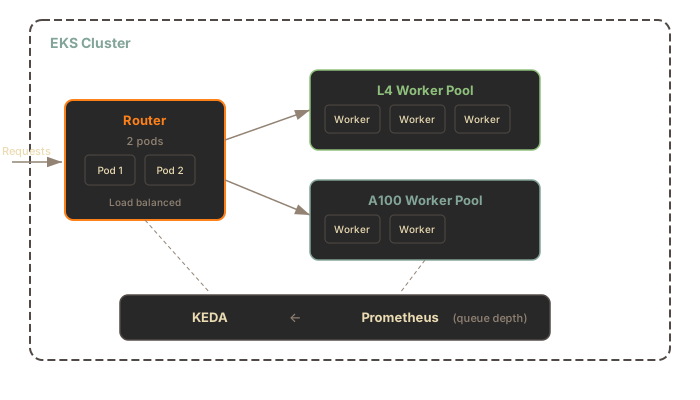
Components:
- EKS Cluster with managed node groups for GPU instances
- NVIDIA Device Plugin for GPU scheduling
- IRSA (IAM Roles for Service Accounts) for S3 access
- KEDA for autoscaling based on queue depth metrics
- Prometheus + Grafana + DCGM Exporter for observability
Terraform Setup
Section titled “Terraform Setup”Prerequisites
Section titled “Prerequisites”- AWS account with appropriate permissions
- GPU instance quota for your region (e.g.,
g5.xlargefor L4-equivalent,p4d.24xlargefor A100) - Terraform and AWS CLI configured
Deploy
Section titled “Deploy”cd deploy/terraform/aws
# Set your variablesexport TF_VAR_region="us-east-1"
# Initialize and applyterraform initterraform planterraform applyOr use the mise task:
mise run aws-deployWhat Gets Created
Section titled “What Gets Created”The Terraform module provisions:
| Resource | Purpose |
|---|---|
| EKS Cluster | Kubernetes control plane |
| GPU Node Group | Auto-scaling GPU instances (g5, p4d, etc.) |
| NVIDIA Device Plugin | GPU scheduling in Kubernetes |
| KEDA | Autoscaling based on queue metrics |
| Prometheus + Grafana | Metrics and dashboards |
| DCGM Exporter | GPU metrics (utilization, memory, temperature) |
| SIE Helm Release | Router + worker deployment |
Differences from GCP
Section titled “Differences from GCP”| Feature | GCP (GKE) | AWS (EKS) |
|---|---|---|
| GPU scheduling | Native GKE support | NVIDIA Device Plugin required |
| IAM for pods | Workload Identity | IRSA |
| Model cache storage | GCS (gs://) | S3 (s3://) |
| Node provisioning | GKE Autopilot / NAP | Karpenter or Cluster Autoscaler |
| Spot instances | Spot VMs | Spot Instances |
S3 for Model Cache
Section titled “S3 for Model Cache”Configure the cluster cache to use S3:
workers: common: clusterCache: enabled: true url: s3://my-bucket/modelsIRSA handles authentication automatically — no access keys needed in the pod.
Security Considerations
Section titled “Security Considerations”The default Terraform configuration exposes the API endpoint publicly. For production:
- Restrict ingress to your VPC CIDR or specific IP ranges
- Enable authentication via oauth2-proxy or static tokens
- Use a private load balancer for internal-only access:
ingress: enabled: true annotations: service.beta.kubernetes.io/aws-load-balancer-internal: "true"Docker on AWS (Alternative)
Section titled “Docker on AWS (Alternative)”For simpler deployments, run SIE directly on a GPU EC2 instance:
# On a g5.xlarge (NVIDIA A10G) instancesudo apt-get install -y nvidia-container-toolkitsudo systemctl restart docker
docker run --gpus all -p 8080:8080 \  -v ~/.cache/huggingface:/app/.cache/huggingface \  ghcr.io/superlinked/sie:default
This is simpler than EKS and suitable for single-instance production workloads.
What’s Next
Section titled “What’s Next”- Upgrade Runbook - pre-upgrade checklist, rolling updates, and rollback
- Scale-from-Zero - understanding the 202 flow and cold starts
- Monitoring - metrics, alerts, and dashboards
- Kubernetes in GCP - equivalent GKE deployment