
Scale-from-Zero & Autoscaling
SIE clusters scale GPU workers to zero when idle and provision them on-demand. This page explains the full lifecycle, cold start expectations, and how to handle 202 responses.
How Scale-from-Zero Works
Section titled “How Scale-from-Zero Works”When all workers are scaled to zero and a request arrives:
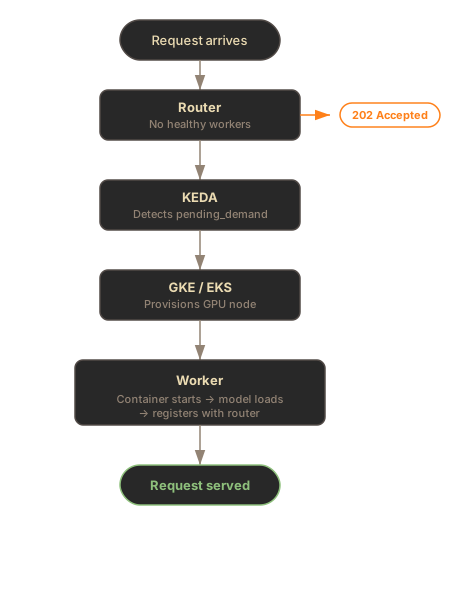
Key point: The X-SIE-MACHINE-PROFILE header (or SDK gpu parameter) is required for the router to know which worker pool to target. Without it, you get a 503 instead of a 202.
Cold Start Timeline
Section titled “Cold Start Timeline”Cold start from zero has three phases:
| Phase | Duration | What Happens |
|---|---|---|
| Node provisioning | 2-5 min | GKE finds a GPU node (spot takes longer if scarce) |
| Container startup | 20-40s | Pull image, start process, health checks pass |
| Model loading | 10-120s | Download weights (if not cached) and load to GPU |
Total cold start: 3-7 minutes depending on model size and spot availability.
Once a worker is warm, subsequent requests for any model on that worker are fast (model loads on-demand from local cache in 10-120s, or instantly if already in GPU memory).
The 202 Flow
Section titled “The 202 Flow”HTTP Clients
Section titled “HTTP Clients”When the cluster is scaled to zero, HTTP requests receive a 202 Accepted response:
curl -X POST http://sie.example.com/v1/encode/BAAI/bge-m3 \  -H "Content-Type: application/json" \  -H "X-SIE-MACHINE-PROFILE: l4" \  -d '{"items": [{"text": "Hello world"}]}'
# Response: 202 Accepted# Headers: Retry-After: 120
Your HTTP client should retry after the Retry-After interval. Keep retrying for at least 7 minutes on a cold start.
Without the GPU header, you get 503:
# Missing X-SIE-MACHINE-PROFILE → 503curl -X POST http://sie.example.com/v1/encode/BAAI/bge-m3 \  -H "Content-Type: application/json" \  -d '{"items": [{"text": "Hello world"}]}'
# Response: 503 Service Unavailable# {"detail": {"message": "No healthy workers available"}}
SDK Clients (Recommended)
Section titled “SDK Clients (Recommended)”The SDK handles 202 retries automatically with wait_for_capacity=True:
from sie_sdk import SIEClientfrom sie_sdk.types import Item
client = SIEClient("http://sie.example.com", api_key="YOUR_KEY")
# Automatically retries 202s with exponential backoffresult = client.encode(    "BAAI/bge-m3",    Item(text="Hello world"),    gpu="l4",    wait_for_capacity=True,    provision_timeout_s=420,  # 7 minutes for cold start)
import { SIEClient } from "@sie/sdk";
const client = new SIEClient("http://sie.example.com", { apiKey: "YOUR_KEY",});
// Automatically retries 202s with exponential backoffconst result = await client.encode( "BAAI/bge-m3", { text: "Hello world" }, { gpu: "l4", waitForCapacity: true, provisionTimeout: 420000, // 7 minutes for cold start (milliseconds) });Per-Bundle Scaling
Section titled “Per-Bundle Scaling”Each (machine_profile, bundle) combination has its own KEDA ScaledObject and scales independently.
| Bundle | Models Served | Example ScaledObject |
|---|---|---|
default | BGE-M3, E5, Stella, ColBERT, rerankers | l4-spot-default |
gliner | GLiNER, GLiREL, GLiClass | l4-spot-gliner |
florence2 | Florence-2, Donut | l4-spot-florence2 |
sglang | Large 4B+ parameter models | a100-80gb-sglang |
What this means in practice: If you have encode and score working on the default bundle worker, but then call extract with a GLiNER model, a separate gliner bundle worker needs to scale up. This is a new cold start — expect another 5-7 minutes.
# This uses the default bundle worker (already warm)client.encode("BAAI/bge-m3", Item(text="hello"), gpu="l4")
# This needs the gliner bundle worker (may trigger cold start)client.extract(    "urchade/gliner_multi-v2.1",    Item(text="Tim Cook leads Apple."),    labels=["person", "org"],    gpu="l4",    wait_for_capacity=True,    provision_timeout_s=420,)
KEDA Scaling Metrics
Section titled “KEDA Scaling Metrics”KEDA uses Prometheus metrics to make scaling decisions:
| Metric | Purpose | Used For |
|---|---|---|
sie_router_pending_demand | Requests waiting for a worker type | Scale-from-zero activation |
sie_router_worker_queue_depth | Items queued per worker | Scale-up (add more replicas) |
Configuration
Section titled “Configuration”autoscaling: enabled: true pollingInterval: 15 # Check metrics every 15 seconds cooldownPeriod: 900 # 15 minutes before scaling to zero scaleDownStabilization: 300 # 5 minute stabilization window queueDepthThreshold: 10 # Scale up at 10 pending requests/pod queueDepthActivation: 2 # Activate from zero at 2 requestsCooldown Behavior
Section titled “Cooldown Behavior”After no requests arrive for the cooldownPeriod (default: 15 minutes), KEDA scales workers back to zero. The next request triggers a full cold start again.
- Consistent traffic: Lower cooldown (300s) to keep workers warm
- Bursty traffic: Higher cooldown (900s) to avoid repeated cold starts
- Cost-sensitive: Default 900s balances cost and responsiveness
Machine Profiles
Section titled “Machine Profiles”The X-SIE-MACHINE-PROFILE header (HTTP) or gpu parameter (SDK) determines which worker pool receives the request.
| Profile | GPU | Typical Use |
|---|---|---|
l4 | NVIDIA L4 (24GB) | Standard inference, best price/performance |
l4-spot | NVIDIA L4 (spot) | 60-70% cheaper, may be preempted |
a100-40gb | NVIDIA A100 (40GB) | Large models, high throughput |
a100-80gb | NVIDIA A100 (80GB) | Very large models (7B+ params) |
Spot instances offer significant cost savings but may take longer to provision if capacity is scarce.
Troubleshooting
Section titled “Troubleshooting”503 “No healthy workers available”
Section titled “503 “No healthy workers available””Cause: Missing X-SIE-MACHINE-PROFILE header on HTTP requests, or no worker pool configured for the requested profile.
Fix: Add the GPU header to your request:
curl -X POST http://sie.example.com/v1/encode/BAAI/bge-m3 \ -H "X-SIE-MACHINE-PROFILE: l4" \ -H "Content-Type: application/json" \ -d '{"items": [{"text": "Hello world"}]}'Or use the SDK with the gpu parameter:
client.encode("BAAI/bge-m3", Item(text="hello"), gpu="l4")202 responses that never resolve
Section titled “202 responses that never resolve”Possible causes:
- Too short timeout — Cold starts take 5-7 minutes. Use
provision_timeout_s=420in the SDK - Spot GPU unavailable — Try a different machine profile (e.g.,
l4instead ofl4-spot) - KEDA not configured — Check that KEDA is installed and ScaledObjects exist:
kubectl get scaledobjects -n sie - Prometheus down — KEDA needs Prometheus for metrics. Check:
kubectl get pods -n monitoring
Workers scale up then immediately scale down
Section titled “Workers scale up then immediately scale down”Cause: Requests stopped before the worker became ready. KEDA sees demand drop to 0 and begins cooldown.
Fix: Keep sending requests (or use the SDK with wait_for_capacity=True) for the full cold start duration. The SDK handles this automatically with retry logic.
Models from different bundles not available
Section titled “Models from different bundles not available”Cause: Each bundle runs in a separate worker. Your encode/score models (default bundle) may be warm, but extract models (gliner bundle) need their own worker.
Fix: Send requests with wait_for_capacity=True and a sufficient timeout. The gliner worker will scale up independently.
What’s Next
Section titled “What’s Next”- Kubernetes in GCP - full GKE deployment setup
- Monitoring - metrics for tracking autoscaling behavior
- Bundles - understanding dependency isolation